




.jpg.f9424f01d223febee2f6f1a05fbbde68.jpg)

The download for The Kortz Center Heist, GTA Online's next major update, has gone live early on PS5 and Xbox Series X|S, giving players a head start ahead of its official launch on Tuesday, July 14. As with several previous DLC rollouts, Rockstar Games is letting console players pre-load the update before it actually unlocks — though notably, this option was skipped entirely for the last update, the mansions DLC, likely due to concerns over pre-release leaks.
Players can find the pre-load by heading to the updates section on their console, where The Kortz Center Heist will appear labeled as a pre-download. Downloading it now won't unlock any new content early — GTA V and GTA Online will play exactly as they do today until the update officially flips on. The point is simply to save time so players can jump straight into the new content the moment it drops.
It's also worth noting the pre-load is currently restricted to current-gen consoles only. PC, PS4, and Xbox One players will have to wait for the official release to begin downloading.
Download Size
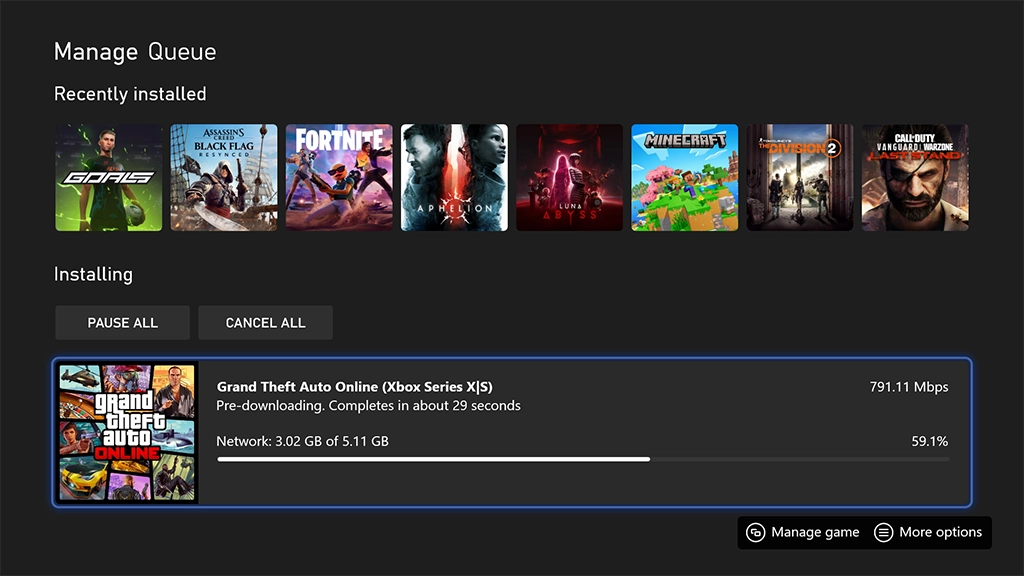
On PS5, the pre-load comes in at roughly 1.9GB, while Xbox Series X|S players are looking at a slightly larger 5.11GB.
That makes this the smallest GTA Online update file size in several years. For comparison, Money Fronts weighed in at 3GB, Bottom Dollar Bounties at 5.6GB, and Agents of Sabotage at a hefty 6GB on PS5. The modest size could hint that Kortz Center Heist is lighter on new content than past major updates — which would track, given that GTA 6 was originally expected to have already launched by this point in the year.
When Does the Update Actually Go Live?
Players on PC, PS4, and Xbox One will need to wait until the official release window — 10am BST on July 14 — before they can begin downloading at all. PC players will get access across Steam, the Epic Games Store, and the Rockstar Games Launcher shortly after. PlayStation has already listed the update as installable from 10am UK time on Tuesday, confirming earlier expectations.
A Brief History of GTA Online Pre-Loads
Pre-loading GTA Online updates isn't new. The feature debuted with San Andreas Mercenaries in summer 2023, and Rockstar has used it intermittently since — including for The Chop Shop that December, Bottom Dollar Bounties in June of last year, and Agents of Sabotage in December 2024. All four of those updates were made available to PlayStation players a full 48 hours before launch.
This marks only the second time Rockstar has extended pre-load access to Xbox as well, following Microsoft's own platform-level testing of the feature just over a year ago. However, last-gen consoles — PS4 and Xbox One — have once again been left out of the pre-load window this time around.
Tuesday will also mark the start of a new GTA+ month in GTA Online, meaning players have just a couple of days left to claim this month's exclusive perks and rewards before they rotate out.
Recommended Comments