Tools
Tools for modifying the GTA V Online experience.
4 files
-
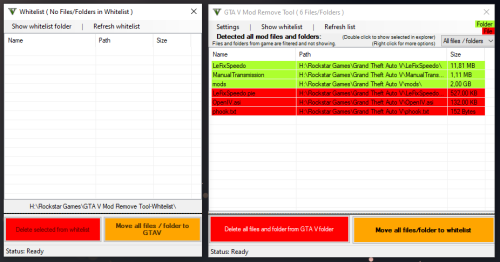
You want to clear your whole GTA V directory from mods and don't know which files you need to delete?
This tool helps you to detect all mod files and folders and gives you the chance to delete all mods.
Attention: Screenshots may differ from the current version!
My Discord server (Support)
! TRANSLATER NEEDED !
I want to expand my tools and integrate multilanguage support, and i need the help from the community.
Feel free to join the discord and contact me from the translation app ( #📁languages )!
_________ CONTENTS _________
1. System Requirement
2. Information
3. How to use
4. FAQ
5. Known Bugs
6. Credits
7. Latest Changes
_________ System Requirement _________
--- Microsoft .NET Framework 4.8
_________ Information _________
This Tool show all mod files and folders.
Tested for GTA Online!
No Guarantee or Support for Pirated Versions of GTA5!!!
_________ How to use _________
1. Start this Tool
2. Look which files / folders you need to delete manually or
3. Click on "Delete all mods" and this deletes all installed mod files and folders :)
_________ FAQ _________
--- What do this Tool exactly?
This tool shows you all your installed mods (files and folders)
--- Are there more planned features?
Not yet. But I'm working to equip this tool with many features as possible.
--- Why do the Tool run with Administrator rights?
The new Rockstar Launcher sets the GTA V folder to a state where any changes need admin rights. Even if you disable this state, it will change it everything you run the Launcher.
That's why the Tool needs to be started with Administrator Rights.
--- Anti-Virus flagged it, is this safe?
The Tool has features like Scanning whole folder, Delete and move files / folders and MD5 Hash scan. Some Anti Viruses don't like features like that, but i promise you, you have whole control about your files and the tool.
_________ Known Bugs _________
- Some users reported that the tool deleted their game files too.
The problem is, I can't reproduce that, and sadly those users didn't give me useful information to reproduce that "bug".
It will also show the game files if that "bug" is happening. So please activate your brain instead of just clicking delete!
If that "bug" happens to you, PLEASE report it to me before you give a bad rating!
I'll do my best to fix this, but i really need more information instead of "this tool deleted my whole game". The target of this tool is not deleting the whole game or game files/folder.
_________ Credits _________
- Gang1111 (Developer)
_________ Latest Changes _________
2.4.8.1 was successfully released!
> [Added] All game files that was added on update v3570/v889
> [Added] EE (Enhanced Edition) & LE (Legacy Edition) check (The tool now will show if you selected EE or LE of the game)- Free
- 9 Downloads
Submitted -
GTA V Enhanced Compatibility Patcher for OpenIV
Introduction
This script is an essential utility for anyone using the new Grand Theft Auto V Enhanced. Many popular tools, including the current version of OpenIV, have not yet been updated to recognize the new game executable, GTA5 Enhanced.exe. They still search for the original GTA5.exe, causing compatibility issues.
This patcher solves the problem automatically. It configures your existing OpenIV installation to correctly locate your official Grand Theft Auto V Enhanced game folder and creates the necessary files to ensure full compatibility until OpenIV is officially updated.
Simply run this script once, and you'll be ready to mod the new version of the game without any manual file editing.
Features
• Seamless OpenIV Integration: Automatically updates OpenIV's settings to correctly identify the path to your official Grand Theft Auto V Enhanced installation.
• Essential Compatibility Fix: Creates a copy of the official GTA5 Enhanced.exe and renames it to GTA5.exe. This workaround is important for making the game recognizable to OpenIV.
• OIV Auto-Installer Ready: Generates an empty OpenIV.asi file, allowing installing .oiv files without need of using original OpenIV.asi. (See the important note below for full mods folder activation).
• User-Friendly: A simple folder selection dialog makes the process quick and easy. No manual editing of XML files is required.
• Safe and Reliable: Includes error checking to guide you through the process and only makes the necessary changes to get you up and running.
Requirements
Grand Theft Auto V Enhanced: You must have this version of the game installed.
OpenIV: You must have OpenIV installed. It is important that you have run OpenIV at least once before using this patcher so its configuration file exists.
How to Use
1. Download: Download the .bat file from this page.
2. Run the Script: Double-click the .bat file to start the process.
3. Select Your Game Folder: When the folder selection dialog appears, navigate to and select your main
4. Grand Theft Auto V Enhanced game directory (the one containing GTA5 Enhanced.exe).
5. Process Complete: The script will perform all necessary actions in seconds. Once it displays the "All operations completed successfully!" message, you can close the window.
Important: Enabling the 'mods' Folder
This script prepares OpenIV to see your game, but to make the famous "mods" folder work correctly with this new version of GTA V, one more step is required.
You must download and install the OpenRPF.asi loader. This file is required to redirect the game to load assets from your "mods" folder instead of the original game files.
• Download Link: OpenRPF.asi for GTA V Enhanced
Place the downloaded OpenRPF.asi file into your main Grand Theft Auto V Enhanced directory (the same folder where GTA5 Enhanced.exe is located).
Critical Post-Installation Steps
After running this patcher, it is very important that you DO NOT take the following actions:
• Do NOT install the original OpenIV.asi or other files from the OpenIV ASI Manager. This patcher provides the necessary files for compatibility. Installing the original files will break the fix.
• Do NOT delete the created GTA5.exe or the blank OpenIV.asi file. The blank OpenIV.asi acts as a "bait" file that tricks OpenIV into enabling the installation of .oiv packages into the 'mods' folder. The game itself does not see or react to this blank file. The duplicate GTA5.exe is required for OpenIV to detect the game.
Troubleshooting
If you encounter an error, please read the message in the command prompt. Here are some common issues:
• "ERROR: No folder was selected."You clicked "Cancel" or closed the folder selection dialog. Please run the script again and select your main game folder.
• "ERROR: OpenIV settings file not found..."You need to run OpenIV at least once to create its settings file. Please open and then close OpenIV, then run this script again.
• "ERROR: 'GTA5 Enhanced.exe' was not found..."You selected the wrong folder. Make sure you are selecting the main game directory that contains the official GTA5 Enhanced.exe file.
• "ERROR: Failed to create 'GTA5.exe' or 'OpenIV.asi'..."The script lacks permission to create files in your game directory. Please right-click the .bat file and select "Run as administrator".
Disclaimer: This script modifies the configuration file for OpenIV. It is designed as a compatibility fix and is safe to use. However, as with any tool that modifies game-related files, I am not responsible for any issues that may arise. Always back up important data.
Originally made for CoreFX (https://www.patreon.com/c/crxhvrd), released to the public because it works better than other fixes.- Free
- 337 Downloads
Submitted -
www.openiv.com
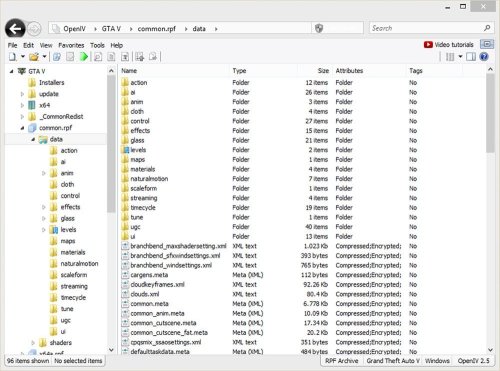
OpenIV is a multi-purpose editor and archive manager for PC versions of Grand Theft Auto V, Grand Theft Auto IV/EFLC and Max Payne 3.
What’s new in OpenIV 4.0:
• Red Dead Redemption 2 support
What’s new in OpenIV 3.2:
• Support for many GTA V ymt files
What’s new in OpenIV 3.1:
• GTAV: pedpersonality.ymt support
• XML Syntax validation in OpenIV Text Editor
Full change log http://openiv.com/?p=1483
What’s new in OpenIV 3.0:
• GTA V for PlayStation 4 support
• GTA V Vehicles animations player
• Proper multichannel audio support
• openFormats support for YVR
• support for new shaders in openFormats for GTA V models.
Full change log http://openiv.com/?p=1393
What’s new in OpenIV 2.9.2:
First time since 2015, we have updated OpenIV.ASI – our plugin, which provides mods support for Grand Theft Auto V. The latest version of GTA V has some non-critical changes in the code, which affected by OpenIV.ASI, and we made similar changes in our code. Without those changes in OpenIV.ASI, your game had crash during loading screen in some very specific scenario, only when you have Simplified Chinese language selected in game. Use ASI Manager to update OpenIV.ASI in your game folder.
• We fixed an issue where sometimes OpenIV crashes while renaming folders inside archives.
• We fixed an issue where import of texture image with 2×2 sizes was impossible due to infinite loading.
• We fixed an issue where files was not shown in OpenIV after they was drag-and-dropped in game folder using Windows File Explorer.
What’s new in OpenIV 2.9.1:
Open folder: You now can open folders the same way as archives. Use menu “File > Open folder…” and select folder you want to open. Selected folder will appear at the end of the list in navigation tree.
Delete confirmation dialog: OpenIV will now show you delete configuration dialog, it will help you to avoid accidental removal of game files. You can disable this feature in OpenIV configuration.
Grand Theft Auto V
• We added support for carvariations.ymt file
• We added support for vfxvehicleinfo.ymt file
You can edit those files using inbuilt OpenIV Text editor or export them to META/XML format.
Grand Theft Auto IV
• We fixed an issue where wrong High Level Code was generated in SCO Viewer.
General changes, improvements, and fixes
• We fixed an issue where it was impossible to use context menu on travel buttons (Back/Forward) when history list contain many items.
• We fixed an issue where some users might get “Unable to initialize Windows DirectX subsystem” fatal error message.
• We added ability to use keyboard arrow keys to navigate through shaders information in models viewer.
• We made minor visual changes in “More information” dialog in models viewer.
• We fixed an issue where users might see “Confirm edit mode” dialog while creating archive in edit mode.
• We changed keyboard shortcut for creating new archive from “Ctrl + N” to “Ctrl + Shift + N”.
• We added ability to use “Ctrl + N” keyboard shortcut for creating new archive in current location (Same as “Ctrl + D” for folder).
• We fixed an issue where status bar does not updates when items are added or removed.
• We fixed an issue resulting in unexpected behavior when double-clicking on group header in file list.
• You now can use “Shift + Delete” keyboard shortcut for permanently deleting files while using Recycle Bin (This works for files on disk not for files in archives).
• We fixed an issue resulting in “Edit mode” button become disabled in specific scenario.
• We improved support for Junctions or Symbolic links. You now will be able to use global search while your game folder is Symbolic links.
• We changed the way how Size column is displayed in file list. Now it works just like Windows File Explorer.
• Some more changes was made, they are minor or are not worthy of mention.
Version 2.9:
Inbuilt Text Editor
Support for .ymap, .ytyp, _manifest.ymt, carcols.ymt and levels.ymt
Improved openFormats for Grand Theft Auto V
Search improvements
UI Improvements and bug fixes
And more
Version 2.8:
openFormats for Grand Theft Auto V models
Package Installer improvements
Administrator mode notification
UI Improvements and bug fixes
And more
Version 2.7:
openFormats development
Brand new Package Installer
Improved support for "mods" folder in Grand Theft Auto V
Bug fixes and minor improvements
Version 2.6.4:
Audio Exporting
Ability to export audio files to .wav format
Audio Editing
Ability to edit audio files (.awc) like weapon and vehicle sounds
Version 2.6.3:
ASI Manager
New tool named “ASI Manager” allows you to easily install or uninstall ASI loader and our plugins for GTAV.
OpenIV.ASI 1.1
New version of OpenIV.ASI gives you ability to keep original GTAV files safe and put mods into special “mods” folder. Just put archive (for example, x64a.rpf) you want to mod into “mods” folder and made changes in that copy. OpenIV.ASI will force game load your archives form “mods” folder. In addition, if you want to switch back to original files just remove OpenIV.ASI and ASI Loader using ASI Manager.
Texture editor for GTA V
Powerful OpenIV texture editor now have support for GTA V .ytd texture files. You are free to edit any .ytd files using all features we have.
Fragment Models Viewer
Finally, OpenIV fragment models viewer got support of GTA V .yft files. This will allows you to view GTAV vehicles models.
Critical bug fixed
We also have fixed some critical issues in our code. Now you have less chance to corrupt your files.- Free
- 6 Downloads
Submitted -
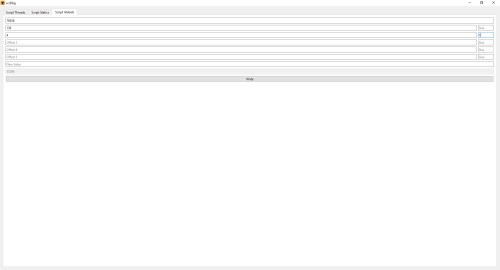
scrDbg is an external script debugger for Grand Theft Auto V (Legacy & Enhanced). It allows you to inspect, manipulate, and debug game scripts in real-time.
Source code is available here.
Features:
View running scripts
Pause scripts
Kill scripts
Export disassembly, strings, statics, globals, and natives
View disassembly
Jump to a raw address
Binary search
NOP instructions
Apply custom patches
Generate patterns
View xrefs
Set breakpoints (Enhanced only, requires ScriptVM.asi)
Statics editor
Globals editor
Usage:
Disable BattlEye from Rockstar Games Launcher.
Launch the game.
Run scrDbg.exe.
Changelog:
1.2.0:
Added an option to view xrefs for the selected address in the disassembly view
Added export options for statics, globals, and natives
Added a searchable function list showing name, range, length, and argument/local/return counts
1.1.0:
Added an option to export a script's disassembly to a file
Added translation support for text labels in the disassembly view
Added an option to export only text labels when exporting a script's string table
Added support for displaying native names, hashes, and handlers in the disassembly view
1.0.0:
Initial release
- Free
- 1 Downloads
Submitted

Files
-
LOZ: Tears of the Kingdom Dynamic fps, static fps, and visual fixes patch collection
Free
Mod credits: ChuckFeedAndSeed, patchanon, somerandompeople, SweetMini, theboy181, Wollnashorn, Zeikken Additional credits: Darktalon, Socats My current source for 0.5.0 is at https://bitbucket.org/totk-fpsplusplus/dynamicfps Install Instructions Download Mods.zip, and extract your desired mods into the game's mods directory. Important Notes: Note that you should not set the emulator speed% past-or-below 100% to target a higher framerate. This will cause unintended behavior, and will technica- 3 Downloads
- 0 Comments
-
Sys-Patch Sysmodule
Free
2025_11_17 UPDATED TO SUPPORT NEW SET OF ES PATCHES. Thanks to the great work of@bthwe have the most recent release with Firmware 21.0.0 support Now full supporting Firmware 21+ and Atmosphère 1.10.0, and avoiding crash when PRODINFO is blanked. Additional, a new Patch was created, this new patch is aimed to avoid the blue screen crash introduced on Firmware 17 when user have their Prodinfo blanked, via incognito / Atmosphère Blanker / Hekate cal0 Blanker. This patch will avoid the crash so t- 14 Downloads
- 0 Comments
-
Skater Pack for MP Male [Add-On]
Free
This mod adds some skater style fashion options for mpmales and mpfemales. What's included are bigger V-neck t-shirts, Oversized T-shirts, modified hoodies, flannel shirts, new beanie textures, skater bag packs, oversized sweaters, big polos, modified baggy jeans and cargo pants and other skater accessories like helmets, wrist guards and kneepads. Also included is a about 14 new skateboard props which can be used however you like. I added the skateboard prop to my game via AddonProps. There are- 6 Downloads
- 0 Comments
-
Immersify [.Net]
Free
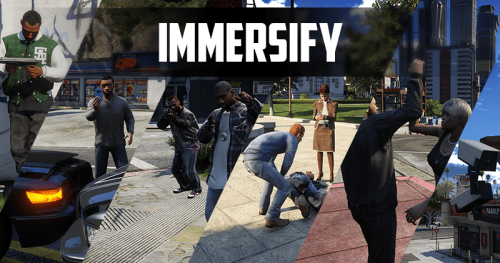
Description Immersify is a mod designed to enhance the interaction between NPCs and player in GTA V. By improving the behavior of peds during various situations, this mod ensures a more realistic and engaging experience. The goal is to create a dynamic environment where players feel the consequences of their actions and witness more complex interactions as they explore the game world. Full feature list Enemy combat overhaul: Enemy personality types (Coward/Aggressive/Tactical) Advanced play- 4 Downloads
- 0 Comments
-
Cayo Perico Wave Survival Zombies
Free
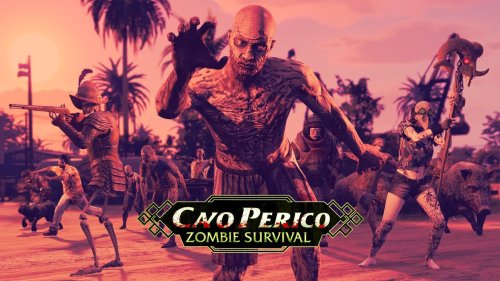
LATEST GAME VERSION IS RECOMMENDED FOR THIS MOD, HOWEVER AT A MINIMUM YOU NEED AGENTS OF SABOTAGE DLC. Welcome to my own take on Cayo Perico Wave Survival, The tropical paradise of Cayo Perico has fallen silent. Once a party island ruled by drug lords and bass drops, it’s now crawling with the undead. In this mod, you’ll fight wave after wave of relentless zombies in a desperate struggle to survive. Inspired by Call of Duty Zombies, this mod brings fast-paced, round-based combat to GTA V — com- 5 Downloads
- 0 Comments