




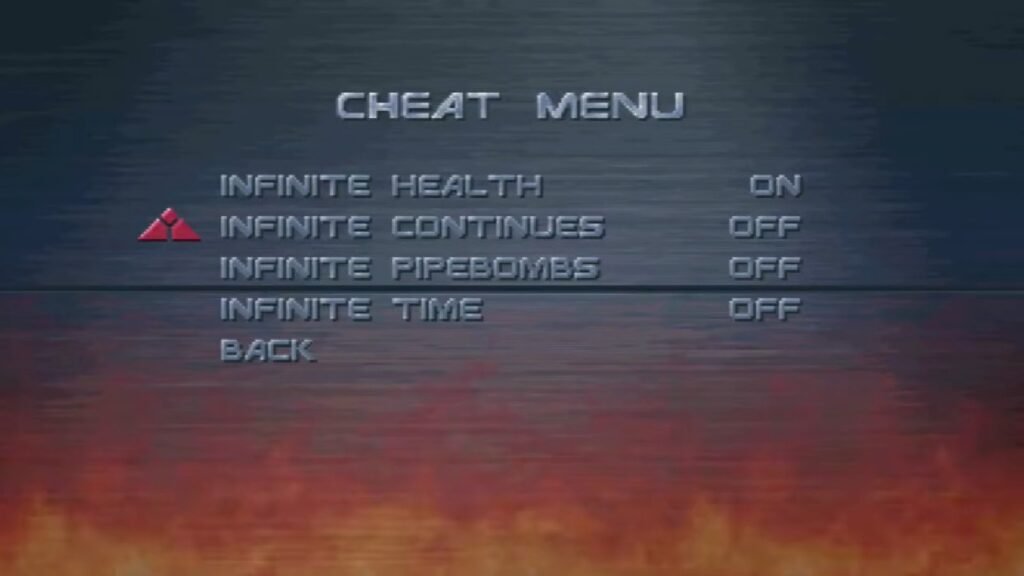

You don't need to enter a button combination on the title screen. Instead, you have to "hack" the options menu.
Go to the Options menu from the main title screen.
Select Accessibility.
Highlight the CRT Shader option (usually the top option).
Toggle it Left and Right repeatedly.
Do this quickly for about 5-10 seconds.
Keep going until you hear a voice say: "Access Granted."
Back out to the main Options menu. You will now see a new Cheats option at the bottom.
The Cheats Available
Once unlocked, you can toggle these on/off at will. Note that using these might disable Leaderboard submissions, but they usually don't block achievements/trophies depending on the platform patch.
Infinite Health: You take damage but never die.
Infinite Continues: Essential for brute-forcing your way through the final level.
Infinite Pipe Bombs: Grants unlimited heavy ammo (very fun for the Cyberdyne level).
Infinite Time: Removes the arcade timer (great for exploring for secrets).
Other Secrets & Easter Eggs
"Easy Money" Shorts: If you play on the easiest difficulty ("Easy Money"), the T-800 will spawn in the biker bar wearing colorful beach shorts instead of being fully nude/obscured.
Future John Connor: If you have unlocked the timeline where John survives into the future, look for the "Ain't Got Time to Bleed" achievement/trophy, which triggers during the bunker defense sequence.
Recommended Comments