




.avif.11467d0987775086eee29abad5fbef28.avif)

Rockstar Games has quietly slipped another piece of GTA 6 footage onto its official website, and fans are already poring over every frame. The clip surfaced as part of a broader update tied to the game's Ultimate Edition pre-order page, which also brought pricing details, more than 60 new screenshots, and other promotional material.
Where to find it
Unlike a traditional trailer, this footage isn't hosted as a standalone video file you can easily pull up and rewatch. It's built into the GTA VI Ultimate Edition page as a scrollable element that can't be paused or viewed in fullscreen like a normal video, which is why outlets like RockstarINTEL extracted and reposted the clip separately so fans could examine it more closely.
What the footage actually shows
The clip features protagonists Jason and Lucia standing on the beach in Vice City, in the in-game state of Leonida, with the scene appearing to take place around midday. Notably, both characters are shown wearing different clothing and hairstyles than their default appearances seen in earlier marketing materials — a small but telling detail, since it hints at the customization or outfit-switching systems players can expect during missions or free roam.
On the technical side, the footage runs at 4K resolution and 30 frames per second, which lines up with what's expected for the Xbox Series X|S and PS5/PS5 Pro versions of the game at launch.
Part of a bigger drip-feed
This beach clip is just the latest in a string of small footage leaks and official reveals Rockstar has been releasing in the lead-up to launch. A separate clip shared around the same time as the cover art reveal showed an aerial, sunset view of Vice City, packed with details fans have since dissected frame by frame — multiple aircraft in the sky, boats moving across the water, and what appears to be confirmation of parallax window interiors, a notable upgrade from the flat building textures of GTA 5.
Between the cover art announcement, the aerial sunset clip, and now this beach footage, Rockstar appears to be building momentum ahead of pre-orders, which open on June 25. The game is still on track for a November 19, 2026 release on PlayStation 5 and Xbox Series X/S, with no PC release date confirmed yet.
Why fans are zooming in
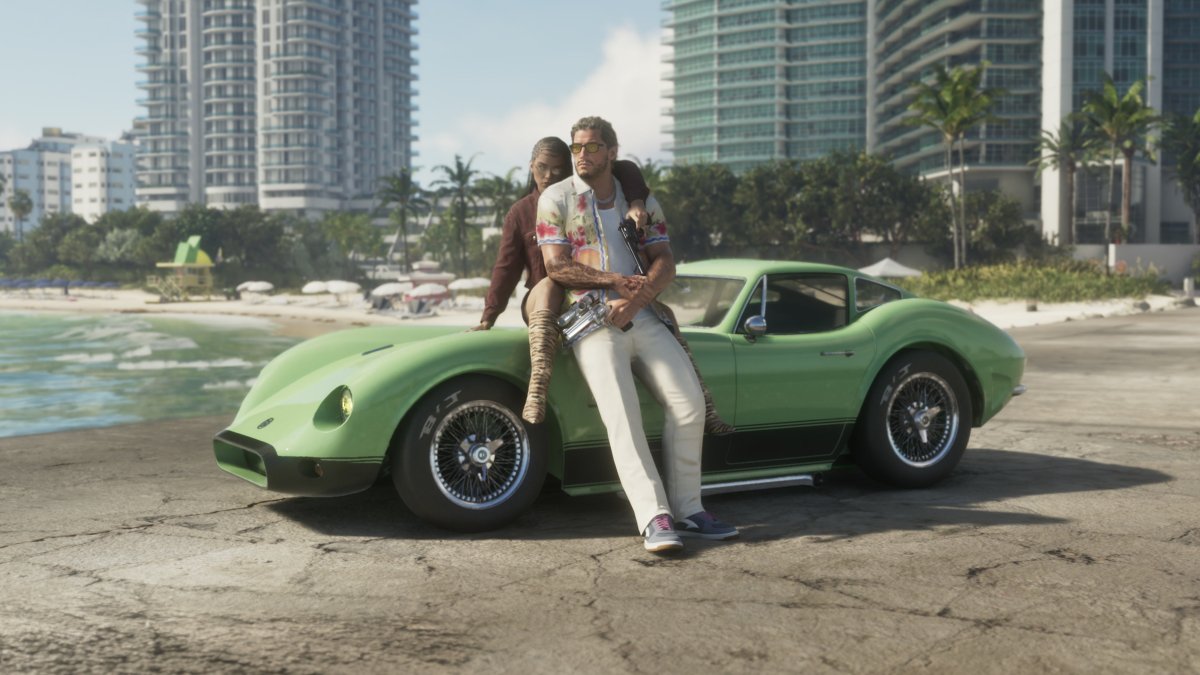
As with every scrap of GTA 6 media released so far, the community has gone into full forensic mode — comparing character models, scanning backgrounds for landmarks, and debating whether details like lighting, water reflections, and crowd density hold up at this stage of development. Some have pointed out minor inconsistencies (like distant reflections not always rendering perfectly), which is fairly normal for open-world games still months from release, where studios often prioritize visual fidelity in foreground areas over far-off scenery for performance reasons.
For now, this beach clip offers one more small but meaningful glimpse at the tone Rockstar is going for: a sun-drenched, lived-in Vice City where even a few seconds of footage are enough to spark hours of fan discussion.
Recommended Comments