





After more than a year of near-silence, the team behind FiveM has confirmed that the Enhanced-edition version of the popular modding platform is about to launch. Cfx.re, the group that develops FiveM, shared the news in a development update posted to its official forum this week, ending months of speculation from a community that had grown increasingly restless waiting for concrete details.
FiveM for GTA V Enhanced will enter early access on Tuesday, July 21st, 2026. The "early access" label is a deliberate choice — the developers acknowledged that a launch of this scale is likely to come with early hiccups, and framed the initial rollout as the start of an ongoing collaboration with server owners and players rather than a finished, polished product.
What's Changing Under the Hood
The bulk of Wednesday's post focused on the technical work that's gone into the new version, touching on networking, scripting runtimes, server-side performance, and the tools developers use to build and manage FiveM servers. It's a broad list, and it reflects just how much of the platform has reportedly been rebuilt to run on the Enhanced version of GTA V rather than the legacy release most servers still rely on.
Two changes stood out as concrete, player-facing improvements:
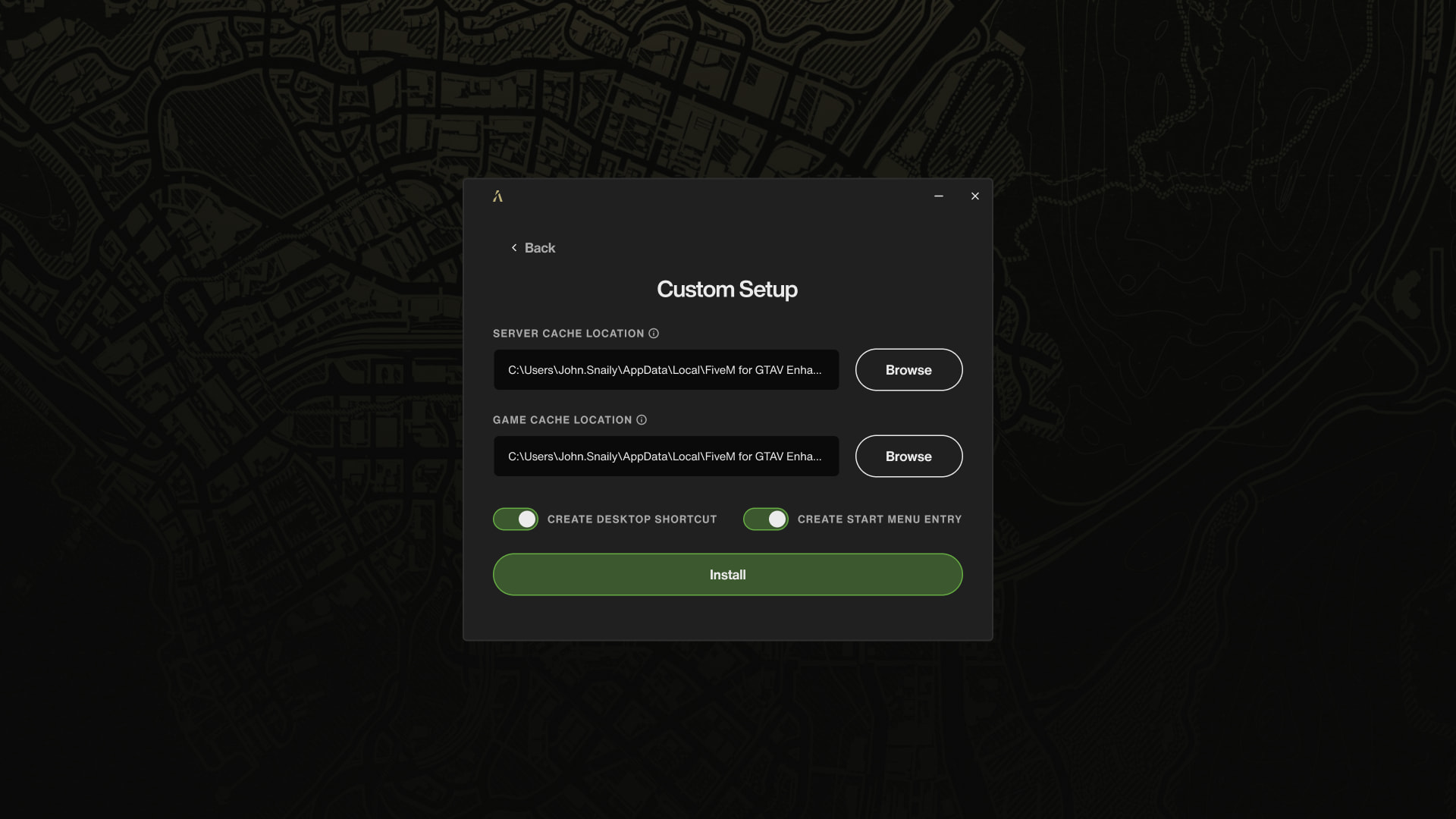
A redesigned installer. Setup now gives users far more control over where FiveM lives on their machine, including the ability to route cached server files to a separate folder or drive — a small but meaningful fix for anyone who's had to juggle limited disk space. The installer will also let users create desktop and Start Menu shortcuts on setup, and adds proper support for repairing or uninstalling an existing installation without digging through folders manually.
Smarter cache handling. The client will now automatically clear out cached files tied to servers that no longer serve them, cutting down on the digital clutter FiveM installs have been known to accumulate over time. Cfx.re says this is just the first step — the team is planning further additions down the line, including automatic cleanup for servers a player hasn't visited in a while, along with a dedicated cache management screen built into the game's settings menu.
Why This Has Been Such a Long Wait
FiveM for GTA V Enhanced was first announced well over a year ago, but Cfx.re has said relatively little publicly since then, a quiet stretch that fueled frustration among roleplay and mod server communities eager for a modernized platform. This week's update is the clearest signal yet that the wait is nearly over, and it comes with enough technical detail to suggest the team has been heads-down on the rebuild rather than sitting on the announcement.
Community members can expect the early access launch to be a work in progress by design. Cfx.re has framed the coming weeks as a feedback-driven process, with further refinements expected to roll out based on how the platform performs once real servers and players get their hands on it.
FiveM for GTA V Enhanced goes live in early access on July 21st, 2026.
Recommended Comments