




.jpg.8834c0806e1bb653d5f8fd1102f37cba.jpg)

Every game is getting in its final update of the year before the holiday period gets underway, and Sega has today rolled out a major patch for Sonic Racing: CrossWorlds.
On the Nintendo front, this marks the arrival of the Switch 2 Edition as well as the Upgrade Pack for existing Switch owners.
Apart from this, there's a lot of new content in this update. This includes new gadgets, an increase to the world match rating, additional friend settings, anti-cheat measure improvements and much more. Here's the full rundown of patch Ver 1.2.0, according to Sega's official website:
Sonic Racing: CrossWorlds - Ver.1.2.0 (3rd December 2025)
Thank you all for playing Sonic Racing: CrossWorlds! Today, we’re releasing patch Ver.1.2.0!
Please update your game to the latest version to access the online modes, including World Match, and downloadable content.
PS5/PS4: Patch Ver.1.2.0
Nintendo Switch/ Nintendo Switch2: Patch Ver.1.2.0
Xbox XS/One: Patch Ver.1.2.0
Steam: Patch Ver.1.2.0
Epic: Patch Ver.1.2.0
Content Update Summary
Added new event mode “Legend Competition”
Increased maximum World Match rating from 9,999 to 99,999
Added multi-round options to Friend Match
Added 2 collaboration tracks to the Jukebox
Added 12 collaboration decals
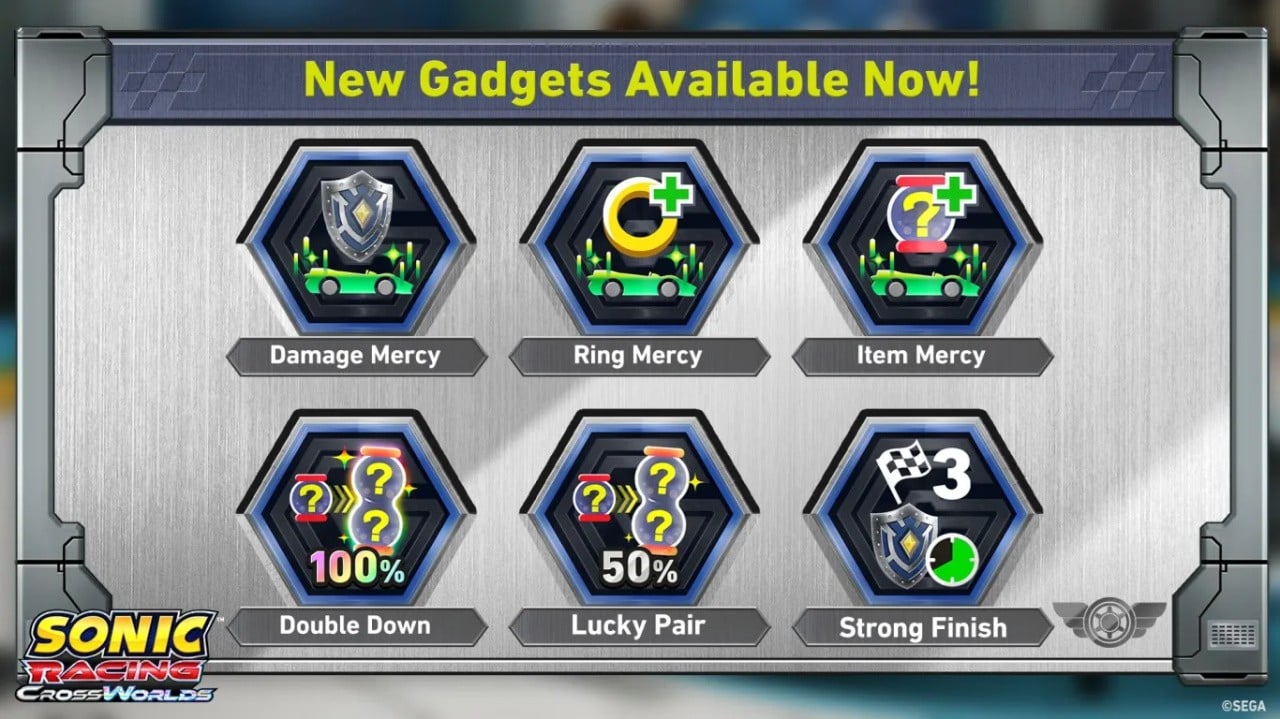
Added 6 new gadgets
Gadget balance changes
Anti-Cheat measures
Other adjustments and bug fixes
Legend Competition
A new mode “Legend Competition” has been added. This mode will occur regularly, with the first competition being held from December 4, 2025 through December 21, 2025.
World Match Rating
We’ve increased the maximum rating from 9,999 to 99,999.
Friend Match Settings
You can now set races to have multiple rounds in Custom Matches in Free Race! No more going back to the lobby after each race!
Jukebox Tracks
No.1 - Crazy Raccoon
Hongami Precious Moment - Inugami Kroone, Tomoya Ohtani
Collaboration Decals
REJ Assemble
REJ Chilidog
REJ ALWAYS CHASING
REJ SUPERCHAOSMODE
REJ LOGO
CR AKAMI KARUBI
CR RAS
CR VANILLA
CR RION
CR AMATSUKI
CR JASPER
CR x SONIC
Gadget Additions and Adjustments in Ver. 1.2.0
Since launch, we’ve observed two common strategies emerge in online matches:
Using drift-type gadgets to maintain top positions.
Staying in 9th – 12th place and using item control gadgets to get powerful items late in the race and quickly jump to top positions.
Both strategies made it very difficult for those in 4th – 8th place to make a comeback.
Therefore, in Ver.1.2.0, we’ve added and strengthened support-type and item-type gadgets to make it easier to make comebacks from 4th – 8th place.
We will continue monitoring online gadget usage and win rates to adjust balance going forward.
New Gadgets
We’ve added 6 gadgets!*
Item Control Type
Lucky Pair
Double Down
Support Type
Ring Mercy
Damage Mercy
Item Mercy
Strong Finish
*Gadgets can be obtained once your Gadget Plate reaches "Silver Plate" or higher.
The following gadgets which were previously distributed as Festival rewards can now be purchased with Donpa Tickets from the gadget customization screen**:
Boost Character Kit
Power Character Kit
Handling Character Kit
Comeback Kit
Sea Dog Kit
**These can be purchased if your gadget plate is “Master Plate” or higher
Gadget Adjustments
Quick Recovery
Further reduced downtime after taking a hit.
Previously, Quick Recovery provided a large benefit when hit, but losing rings often led to lower final positions. The gadget has been adjusted to allow more mid-position endurance.
Acceleration Machine Kit
Recovery timing further reduced to align with Quick Recovery’s adjustments.
Wisp Chance UP
Reduced the influence on item probability.
Previously, Wisp Chance UP made it too easy to collect powerful items before the race’s end and aim for top positions. We’ve dialed this back a bit.
Invincible Start
Vehicles now flash just before the effect ends to make timing clearer.
Other Adjustments
Adjusted the appearance of Silver and Blaze’s AI skins and the color of Race Park rivals “Team Dimension,” as they could be mistaken for Invincible state.
For the eagle-eyed, the new color scheme is based on the “Turquoise Blue” aura Silver the Hedgehog emits when activating his abilities!
Improved machine handling after collisions with other machines in water areas.
Improved directional input detection to make it easier to use items in the intended direction while drifting.
Adjusted race communication to prioritize syncing information that affects race progression, improving correct reflection of Invincibility such as Ultimate Charge activation.
Strengthened anti-cheat measures for races and race results in online play such as Global Match on PC.
Concerning Anti-Cheat Measures
With Patch Ver.1.2.0, we have strengthened our anti-cheat measures to ensure a fair and secure online environment. These improvements focus primarily on countering cheating behaviors that give players an unfair advantage in World Match and Time Trial.
If cheating activity continues to increase, we may be required to consider additional anti-cheat measures across a broader range of systems, depending on the situation. To ensure that all players can enjoy the game safely and fairly, we kindly ask for your continued cooperation in maintaining a fair and secure gameplay environment.
We will continue to listen to the community and make ongoing improvements to protect the player experience and ensure that the game remains a healthy and enjoyable environment for everyone.
Thank you once again for your continued support of Sonic Racing: CrossWorlds.
Bug Fixes
Fixed Festival announcements showing old information before events began.
Fixed a bug where auto-acceleration failed to activate for several seconds after manual input.
Improved smoothness and visibility of left/right movement in item warning display.
Fixed a bug where Charge Dash would not activate when passing through Transform Rings in mid-air drift state using Dash type.
Fixed a bug where attacks from the “King Bomb Boo” item could be avoided using Charge Jump or Handle Assist.
Fixed a bug where “King Bomb Boo” item attacks in mid-air could cause fire pillar direction to be incorrect.
Fixed a bug where using the “Laser” item caused Dash type machine appearance to break at certain times.
Fixed a bug where using the “Boost” item obtained during Boost Frenzy at the exact end of Frenzy could make the item unusable.
Fixed a bug where using the “Tornado” item during Boost Frenzy could make items unusable until Frenzy ended.
Adjusted Dash Gate placement in Dash Gate Frenzy on certain courses where more gates than intended were placed.
Fixed a bug in course “Wonder Museum” where machines could get stuck in the Tornado.
Fixed a bug in course “Sky Road” or “Minecraft World” where using “Slicer” or “Homing Punch” when crossing Travel Rings or End Portals could cause incorrect tracking.
Fixed a bug in course “Steampunk City” where colliding from the side with ground where trains run could cause machines to sink into the ground.
Fixed a bug in course “White Cave” where using “Drill” in cave areas could cause machines to sink into the ground.
Fixed several other gameplay-related bugs.
Recommended Comments