






Jump to content
View in the app

A better way to browse. Learn more.

GTA Forum

A full-screen app on your home screen with push notifications, badges and more.

To install this app on iOS and iPadOS
  1. Tap the Share icon in Safari
  2. Scroll the menu and tap Add to Home Screen.
  3. Tap Add in the top-right corner.
To install this app on Android
  1. Tap the 3-dot menu (⋮) in the top-right corner of the browser.
  2. Tap Add to Home screen or Install app.
  3. Confirm by tapping Install.

Register

Interested in GTA ? Join our community on the GTA Forum ! Exchange knowledge, learn about new things, use guides, and stay up to date with GTA Online and FiveM.

Sonic Racing: CrossWorlds Switch 2 Edition Out Today, Includes Paid Upgrade Path For Switch Players

If you're looking for a reason to jump back into Sonic Racing: CrossWorlds, Sega has this week released the Nintendo Switch 2 Edition of the game digitally.

It's available for $69.99 or your regional equivalent, and will be released in physical form on this platform in "early 2026".

If you're an existing owner of the Switch release and don't want to miss out, there's the Switch 2 Edition Upgrade Pack, which is also available. It's normally priced at $10.00 but you'll get an introductory discount (bringing it down to just $5.00) if you purchase it by 11th December 2025.
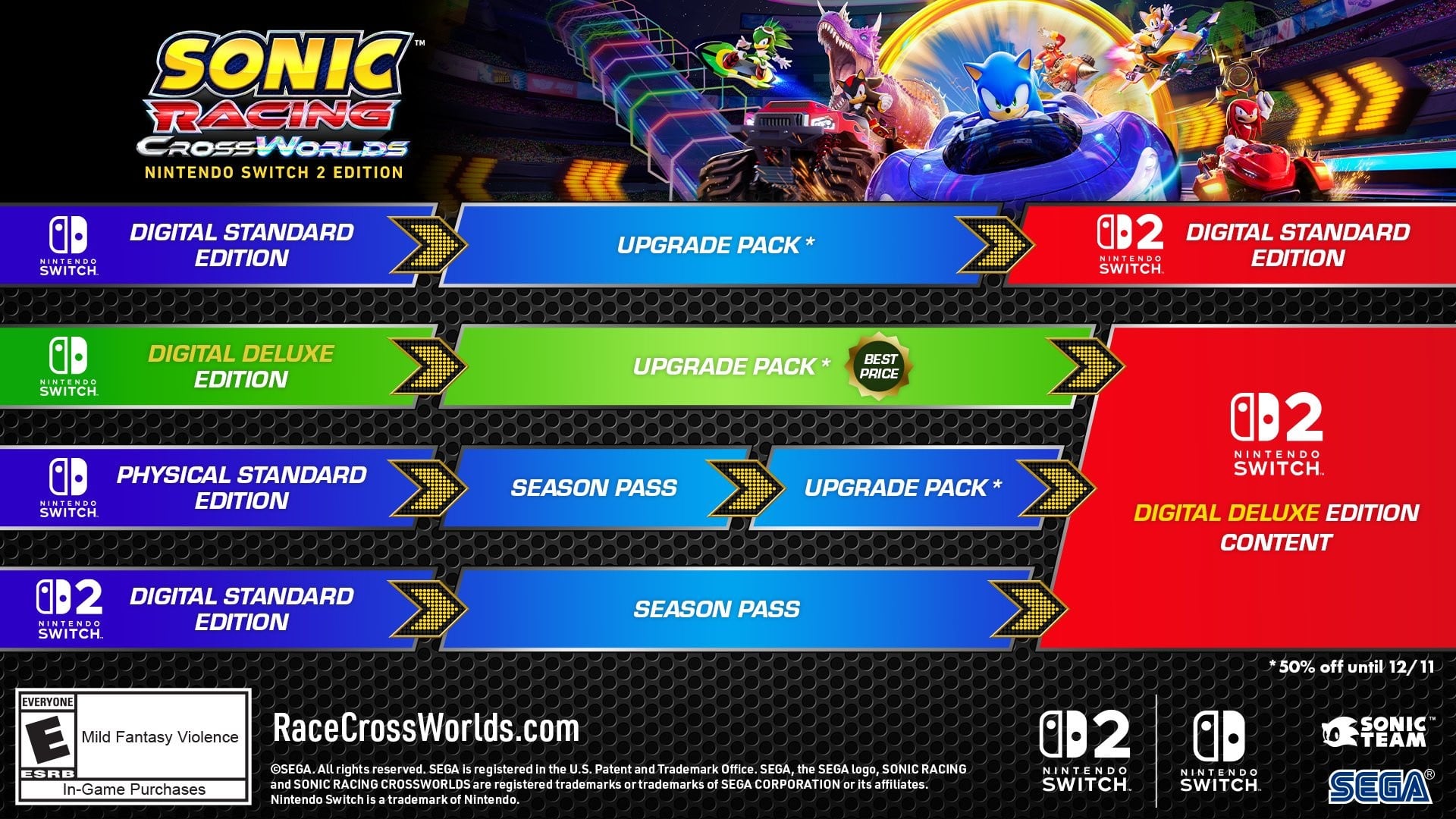
sonic-racing-crossworlds.large.jpg

Sega also notes how the Werehog DLC Pack is available to download for free for the first two weeks of the digital version's availability (until 17th December 2025).

You can also carry over all of your content and progress in the Switch release to the Switch 2 Edition of the game. As previously revealed, the Switch 2 version of the game includes improved performance and resolution.

Alongside the Switch 2 Edition and Switch upgrade, Sega has also released a major patch for this title today.

User Feedback

Recommended Comments

There are no comments to display.

Forum Statistics

  • Total Topics 409
  • Total Posts 430

Configure browser push notifications

Chrome (Android)
  1. Tap the lock icon next to the address bar.
  2. Tap Permissions → Notifications.
  3. Adjust your preference.
Chrome (Desktop)
  1. Click the padlock icon in the address bar.
  2. Select Site settings.
  3. Find Notifications and adjust your preference.